APOCALYX is a...

free Game Engine based on OpenGL (MAIL) (SITE) (FORUM) (BLOG)
Showing posts with label terrains. Show all posts

Thursday, July 24, 2008

Isles tour

The tour continues. Probably, to say that the sea is an open ground is an oximoron, anyway these screenshots belong to the terrain tour serie. Again they are taken from the well known "Hoverjet Racing" demo.

An isle in the Mediterranean Sea

An isle in the Pacific Ocean

A vulcanic isle in activity

Wednesday, July 23, 2008

Terrains tour

In recent messages I have posted a few screenshots of BSP levels rendered by APOCALYX. Usually BSP levels depict indoor scenes, while the last shots simulate an open environment. Let's now consider a real open ground. This time the screenshots are taken from "Hoverjet Racing" one of the most complete and varied demos.

Here you can see a landscape from Mars

Then a shot from the Rocky Mountains

Finally some ice from the Anctartica

Tuesday, July 15, 2008

Backgrounds (II)

A few days ago I talked about the skyboxes available in APOCALYX. In reality there are different kinds of skyboxes, each of them useful in particular situations.
The most suggestive, already available in the first demos (read the post about the ancient origins), is the StarField, here shown behind the robots. It is a collections of points of several sizes and colors, that resemble stars, together with squares depicting galaxies or planets.

Apart the StarField and the Sky, that is a usual skybox - the inner of a closed cube, there are also the MirroredSky, the HalfSky, the SkyDome and the Stellarium:

  • the MirroredSky is useful when the ground is reflective, in fact the sky is repeated under the surface of the ground;

  • the HalfSky is similar to the MirroredSky, but the reflected sky is replaced by an uniform color;

  • the SkyDome replaces the cube with a hemisphere, in this case the colors of the sky are modified accordingly to the hour of the day or night, simulating the brightness of the sun at twighlight, dawn or noon.

  • finally, the Stellarium is an almost complete planetarium (read the "It's full of Stars!" post to know more)

Saturday, July 12, 2008

Backgrounds

One of my preferred 3D tools is Terragen. Thanks to this free (for non-commercial use) terrain generator, I could create all the open terrains that you can see in my demos, but also all the backgrounds.

It's very easy to create a beautiful landscape with mountains, clouds and a shiny sun. After tuning some parameters, it's only necessary to take six shots of the scene with an aperture of 90 degrees in the six main directions, then you can load the images in APOCALYX and apply them to a sky-box. Only two tricks are necessary to merge the background to you actual scene: choose the correct sun inclination, so the lens-flare will appear in the right place, and choose a fog color that corresponds to the color at the hills foots, so objects disappear slowly with distance.

Of course there are also ready-made backgrounds out there. For example, you can see above and below two cube-maps created by Humus from real photos.

Tuesday, May 20, 2008

Terrain performances (II)

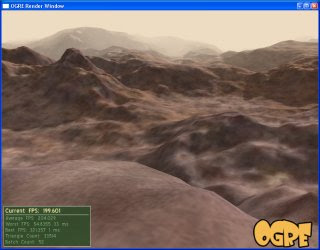
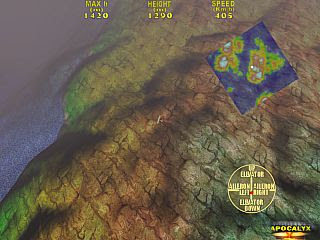
After the comparison between the terrains of Irrlicht and APOCALYX, now it's the turn of the promised comparison between the terrains of Ogre3D and APOCALYX. I have extracted the height-map and color-map from the Ogre3D terrain demo and, then, I have passed the data to the APOCALYX "infinite terrain". The following screenshots show the results.

Ogre3D above, APOCALYX below

Again it's not easy to compare the results. Also Ogre3D, like Irrlicht, applies the color-map to the height-map and superimposes the detail-map. Then the borders of the map are the usual unrealistic square linear cut all around. As I have already explained, APOCALYX applies a color-map (the shadows) to the height-map, then a coarse-map and, finally, the detail-map. No cuts are noticeable when the heigth-map presents periodic boundaries.
Another difficulty was to choose similar detail maps, because the Ogre3D original ones were too light for APOCALYX. Finally, I lost myself in the map and I couldn't set the same view. Anyway, those two pictures give almost the same frame rate.
At the end of the tests, the conclusion is the same as the other comparison: more detail in Ogre3D and Irrlicht, (fake) larger landscapes in APOCALYX.

Sunday, May 18, 2008

Terrain performances

Yesterday I compared the rendering speed of Irrlicht and APOCALYX. I used the same MS3D model and the performences were almost the same. Now it’s the turn of terrains.
I have extracted the height-map, the color-map and the detail-map from an Irrlicht demo. Then that data was read by an APOCALYX “infinite terrain”. The results are shown in the following screenshots.

Irrlicht above, APOCALYX below

It’s difficult to compare the results, because Irrlicht simply applies the color-map (that becomes the main texture) to the height-map, then superimposes the detail-map. In addition when you reach the border of the map, you can see an unrealistic linear cut all around. Instead, APOCALYX applies a color-map (that defines the shadows and the overall color) to the height-map, then a coarse-map (a periodic main texture) and, finally, superimposes the detail-map. No cuts are noticeable if the heigth-map presents toroidal boundaries.
As you can see, I had several difficulties in setting the same parameters in the two demos, but I got two roughly comparable pictures at the end. Unluckily, this time APOCALYX loses 220 fps against 260, but I think that there are too differences for a reliable comparison, because the two kind of terrains possess different advantages: more detail in Irrlicht, larger landscapes in APOCALYX.

Friday, May 16, 2008

Ocean shader

One of the oldest features of APOCALYX was the Ocean terrain (uh, what an oximoron!), that is a simulated water surface where waves are computed with fast fourier transforms. To make that “ocean” more “realistic” an animated texture with caustics was applied. The effect was acceptable only for the very first years of the century, but now is very outdated, in fact, GLSL shaders can simulate very realistic sea surfaces.

You can see in the screenshot the old way to render an ocean on the left, while the modern way on the right. The right side is almost indistinguishable from a real water surface.
APOCALYX already support GLSL shaders, but there is still a problem. In the picture above, only the skybox is reflected on the water, while ships or seagulls and other objects above the surface are ignored. To make the surface reflect all the environment, one must render the scene upside down (like in a horizontal mirror), capture the result in a texture and then render the water surface, passing the texture as an argument to the shader.
The only step, that is still missing in the engine, is the rendering of the reflected scene in a texture, but in the next version all the procedure will be correctly implemented. Stay tuned for more… sailing!

Friday, May 2, 2008

Tiled terrains

A few days ago I talked about the infinite terrains available in APOCALYX. The main characteristic of those terrains is the complex heightfield, correctly shadowed, but mapped with the same uniform textures along their whole extension.
Tiled terrains, instead, are useful when it’s necessary a flat ground plenty of different features, similar to the levels of some 2D game, where complex environments are built from a small set of tiles. Even in a 3D world such a feature may be useful.
You can find an example of tiled terrains at work in the “Steering Behaviors” demo included in DemoPack1 (read the yesterday’s post) or, better, in “Dragon’s Ride”. In both cases, the terrain is built from the nice free tiles, known as “Circle Textures”, from “Lost Garden”. Those tiles can be arranged in several different ways: the “tiled terrain”, implemented in APOCALYX, takes a single large texture, including all the tiles, and applies them on the ground according to the designed fashion. Give new 3D life to your 2D tiles!

Tuesday, April 29, 2008

Infinite terrains

APOCALYX supports a particular kind of terrain with no boundaries. In reality, it is a fake infinite terrain, because it simply repeats the same pattern periodically. Anyway, the pattern can be quite large and the periodicity is not easy to detect, except when recognizable shapes are built in the terrain itself.
To create this kind of terrain you have two possibilities, shown in the flight-simulator series of the demos: “Flying Circus” and “Zeke on Your Six!
The first shows also an application of the built-in “noise” library. It includes functions to generate fractal terrains with their own colors and shadows. This is the simpler and faster way to generate a terrain, but often you need a particular kind of shape for your landscape, thus a random generator of fractal noise is not the best choice.
The second possibility, that is also the obvious one in most 3D engines, is shown in the second demo. The terrain is defined with the help of several images: an height map, that encodes the heights of the terrain in a greyscale image; a color map, that encodes the very large scale color of the map, including the shadows of mountains and hills; a coarse map, that is a texture applied on the large scale; and a detail map, that is a texture applied at small scale to simulate the details of the terrain.
The last two textures are easy to find as free resources on the internet: for example, use seamless textures of rocks, concrete, grass, sand etc. The first two instead (the height map and the color map) must be tailored according to your needs. You can use terrain editors, like Terragen, that generate a ladscape given a few parameters and also provide tools to modify it.
When the editing phase is done, simply take a screenshot of your terrain in the height map editor (this is the grayscale image that defines the height map), then render your terrain applying the light conditions that you prefer (be sure to set up correctly the sun inclination, or the shadows will not match the sun position in your world) and take another screenshot from above (this is the color map with shadows). Remember that the infinite terrain requires a seamless height map, so use the same shape for the opposite sides of the map.
For more details, on how to load your brand-new maps in the engine, read the code of the demos cited above, give a look to the resources zipped in the data files and, finally… fly like an eagle!